
Skip to content

For schools teaching multilingual learners

A Student Misses One Word. The Lesson Keeps Moving.

MAMAKO captions the teacher live on the classroom board and translates each line into the student’s home language, keeping the lesson’s key terms in English so students learn them too. It works over the slides, videos and websites teachers already use.

Students need no account and pay nothing. MAMAKO is sold directly to schools.

Want the data questions answered first? Read how we handle student data.

What MAMAKO does

Language Support While the Lesson Is Still Happening.

MAMAKO runs in Chrome or Edge on the laptop a teacher already projects from. Nothing to install.

  • Captions the teacher live on the classroom board, highlighting each word as it is said
  • Translates the captions into the class’s home language, or up to four languages at once
  • Keeps the lesson’s key terms in English inside the translation, with the student’s word in brackets
  • Turns the lesson into a recap and a list of the day’s words the teacher checks and shares afterward

From a demo lesson

A Biology Class with Japanese Support Switched On.

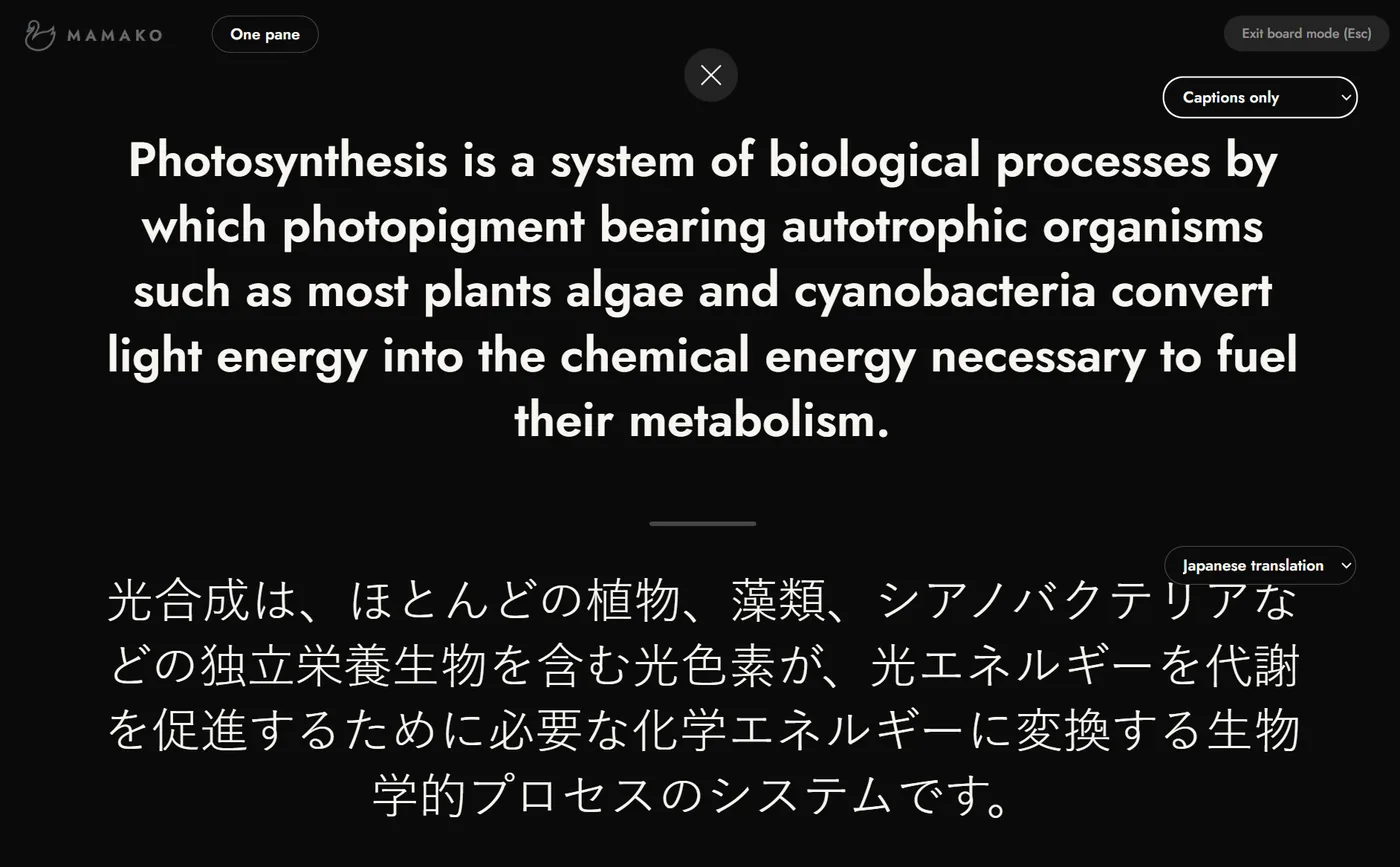
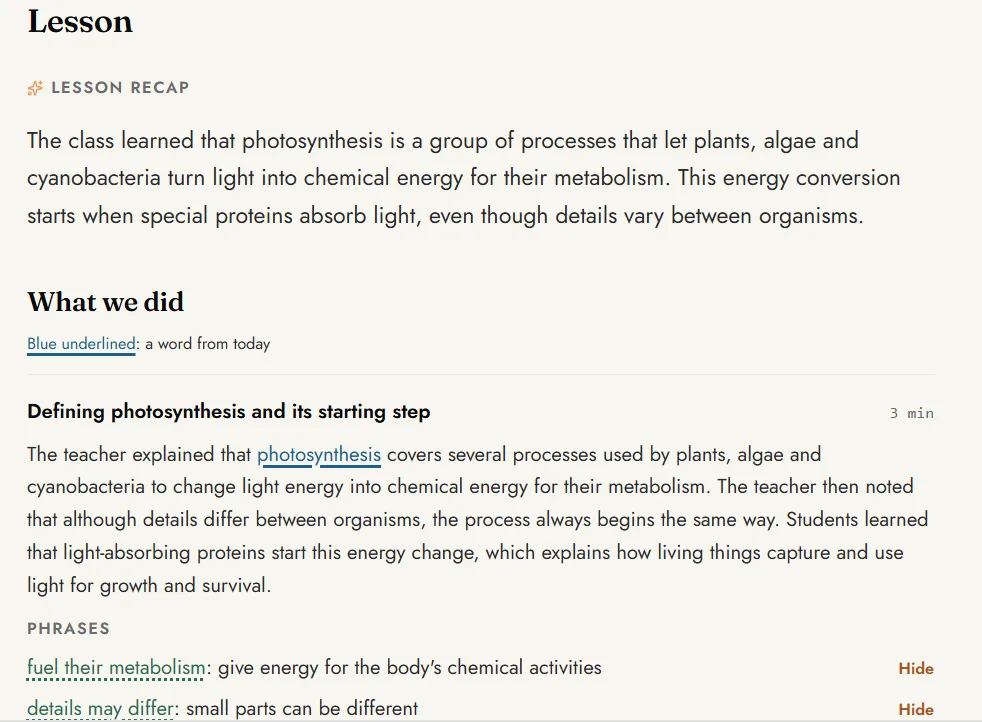
A demo lesson on photosynthesis, from the captions on the board to the recap students can read afterward.

  • Board mode showing an English sentence about photosynthesis with its Japanese translation underneath.
    1.Translate the Live CaptionsThe teacher’s English appears on the board with Japanese underneath.
  • The lesson recap: a short summary of the photosynthesis lesson, a section on what the class did, and useful phrases with meanings.
    2.Check and Share the RecapThe teacher reviews the recap, then shares it with students by link.

Why MAMAKO

Plenty of Tools Caption Speech. MAMAKO Is Built for Students Still Learning the Language.

Help arrives on the board while the teacher speaks, so nobody has to stop the class to ask.

Float it

It stays over everything you teach with.

Captions built into presentation software show only inside that one app. MAMAKO’s caption bar floats over slides, videos and websites in Chrome or Edge, and stays up when the teacher switches windows.

Translate it

Students follow in their language and learn the subject’s English terms.

A plain translation hides the English terms students are tested on. MAMAKO translates each line on the teacher’s laptop and keeps the lesson’s key terms in English with the student’s word in brackets, so the class follows the lesson and learns its vocabulary at the same time. Board mode can show up to four languages at once.

Recap it

The lesson carries on after the bell.

Live captions disappear when class ends. MAMAKO turns the lesson into a short recap the teacher checks and shares with students by link, so they can go back to it on any device.

Wondering about student data? Read the one-page summary.

For parent conferences and staff meetings

Every Parent Hears the Meeting in Their Own Language.

Start a meeting and show the code on your screen. Every phone in the room captions you live, each in the language its holder picks, with nothing to install. Afterwards a short summary waits for you to check before anyone sees it.

Meetings come with a school's MAMAKO Captions plan.

Built for schools

Simple to Roll Out. Careful with Student Data.

What your coordinators and your IT team will want to know before a single lesson.

Rolling It Out

Runs on What Teachers Already Use
Chrome or Edge on the laptop each teacher projects from. There is nothing for IT to install.
Accounts Set Up for You
We create your teachers’ accounts, so they sign in and start teaching.
No Student Accounts
Students read the recaps their teacher shares by link. There are no student logins to create or manage.
One View Across Classrooms
The coordinators your school names see how much each teacher uses MAMAKO, across subjects.

Student Data

  • MAMAKO never records or stores classroom audio.
  • A filter set to the teacher’s speaking level sends quieter classroom sound as silence, unless the teacher turns it off.
  • When a teacher loads a class roster, MAMAKO stars those names out on the teacher’s laptop before anything is saved.

How MAMAKO protects student data has the rest: what is kept, who can see it and for how long.

Read It Before You Talk to Us

One page on what MAMAKO does with student data: the audio, the transcript, who sees what and how long anything is kept. The page your IT or legal review would start from.

The summary arrives by email. I may write once to ask whether you have questions, and I stop if you say so. Privacy

The research

Built on What Helps Multilingual Learners Learn.

Three findings sit behind MAMAKO’s design: captions support listening and vocabulary, vocabulary knowledge shapes how well students read and understand, and planned use of a student’s home language supports learning in English. Each summary links to the study.

Captions

A meta-analysis of studies on captioned video found large effects on second-language learners’ listening comprehension and vocabulary learning.

Montero Perez, M., Van Den Noortgate, W., & Desmet, P. (2013). System, 41(3), 720–739.

Read the study


Vocabulary

Six in ten language-minority adolescents in U.S. middle schools were classified as struggling readers, and vocabulary breadth and depth were the strongest predictors of their difficulty.

Lesaux, N. K., & Kieffer, M. J. (2010). American Educational Research Journal, 47(3), 596–632.

Read the study

Home language

Planned use of students’ home languages alongside the target language helps them learn vocabulary faster and engage more deeply.

Cenoz, J., & Gorter, D. (2022). RELC Journal, 53(2), 342–354.

Read the study

MAMAKO is built by Logan Shaffer, a classroom teacher and Head of English at an international school in Tianjin, who has taught multilingual learners in Korea, Taiwan and China.

How schools buy

Sold Directly to Schools.

Your school buys one pool of class hours, and every teacher you bring on draws on it. We size the pool to your school. Students never pay and need no account.

See how schools buy MAMAKO.

FAQs

The questions schools ask us most.

Who is MAMAKO built for?+

Secondary classrooms taught in English, from middle school through high school, including AP and IB, where students learn academic content while they are still developing the language.

Does MAMAKO replace EAL or pull-out support?+

No. MAMAKO works inside the mainstream lesson, alongside EAL specialists, pull-out programs and co-teaching. It helps with what slips past students during class, so specialist time can go where it is needed most.

Does MAMAKO work across all subjects?+

Yes. It captions the teacher's English in any subject: science, math, humanities and electives. Academic language gets in the way in every English-medium classroom, so MAMAKO is built to run across a whole department.

How does MAMAKO work during class?+

The teacher opens MAMAKO in Chrome or Edge and teaches as usual. Captions appear in a caption bar over the slides, or fill the screen in board mode, with each word highlighted as the teacher says it. The teacher can translate the captions into the students’ language, or up to four languages at once on the board, and the lesson’s key terms stay in English with the student’s word in brackets. Students follow along on the board.

What does a teacher need to set up MAMAKO?+

A laptop with Chrome or Edge, the projector or screen they already teach with, and a microphone. A clip-on microphone gives the most accurate captions. There is nothing to install, and the mic check at the start of a lesson takes seconds.

Do students need accounts?+

No. Students never create MAMAKO accounts. During class they follow the board, and after class they open the recap their teacher shares by link.

What happens after class?+

MAMAKO writes a short recap of the lesson with the day’s key words. The teacher reads it, hides anything they want to keep back, and shares it with students by link.

How accurate is the live transcription?+

Accuracy depends mostly on the microphone and the room. A clip-on microphone and a normal speaking pace give the best results, and a laptop's built-in microphone does worse as the room gets louder or the teacher moves away. No live transcription is perfect, which is why every lesson starts with a mic check that takes seconds.

Is student data safe?+

MAMAKO never records or stores classroom audio. The word-for-word transcript is for the teacher only and is deleted automatically 7 days after the lesson, and MAMAKO never sells school data or uses it to train AI models. Our privacy policy lists the service providers that process data to run MAMAKO.

How much does MAMAKO cost, and how do we start?+

MAMAKO is sold directly to schools. Your school buys a pool of class hours that all its teachers draw on, with every feature included. Ask for a quote and we will size a pool to your school and email you an estimated price. Students never pay.

MAMAKO for your school

Next Period, the Translation Keeps the Key Terms in English.

Tell us roughly how many teachers would use MAMAKO, and we will email you a pool sized to your school, with an estimated price.

Or see it in your language first. Just have a question? Send us a message.